LMC / INDEPENDENT GUIDE

LMC 8.4 R8 APK Download: Files & Release Notes

R8 adds RAW format selection, Sabre controls, lens-specific settings and a separate System settings page. Its notes include a OnePlus RAW geometry fix and video corrections for some Oppo, Vivo and Realme devices. Check the named correction against your exact setup.

Hub listing date2022-03-14
Separate fix dateNot confirmed
Minimum AndroidNot stated in source

Documented changes

  • RAW format selection, additional Sabre options, and noise-level presets were added.
  • Lens-specific settings and a dedicated System settings page reorganize camera controls.
  • The release adds Brazilian translation and addresses operation modes, OnePlus RAW geometry, some Oppo/Vivo/Realme video behavior, and Sabre settings; built-in configs were updated.

Configuration and known limits

  • The same source page also lists three LMC8.4 Lite files; keep their exact names separate from the R8 files.
  • No external config index is linked directly on this release page.

The main catalog separates the R15 and R16+ config indexes. For this historical build, follow the exact release source and its notes; a modern XML listing is not proof it works on this release.

Configuration reference ↗

Install and test this build

Export existing settings before replacing an app with the same package ID. Install one variant, confirm default camera operation, then load a matched XML and test each lens separately. See APK installation, XML import, and crash diagnosis.

Unverified metadata

  • Minimum Android version, file size, cryptographic hash, and exact upstream patch number were not confirmed by this release page.
Exact files and package choices

Variant / exact filenameAndroid package IDAvailability
DefaultLMC8.4_R8.apkcom.camera.lmc84r7Find this APK in the original archive ↗
SnapcamLMC8.4_R8_snapcam.apkorg.codeaurora.snapcamFind this APK in the original archive ↗
SamsungLMC8.4_R8_samsung.apkcom.samsung.android.rulerFind this APK in the original archive ↗
LiteLMC8.4_Lite.apkcom.camera.lmc84liteFind this APK in the original archive ↗
Lite-SnapcamLMC8.4_Lite.snapcam.apkorg.codeaurora.snapcamFind this APK in the original archive ↗
Lite-SamsungLMC8.4_Lite.samsung.apkcom.samsung.android.rulerFind this APK in the original archive ↗

Compare package IDs · Browse XML evidence · All researched releases

When does R8 make sense?

A reason to try it

Relevant changes

You have a known working R8 setup or need to investigate one of its specific corrections.

A reason to keep your current setup

Your current setup

A later release already captures and processes photos reliably on your device.

What to check when you switch

  1. Preserve the old configuration.
  2. Check RAW and JPEG output separately.
  3. Test each lens rather than assuming duplicated settings behave identically.
Before importing your XML

The same page lists Lite files alongside R8; keep those filenames distinct.

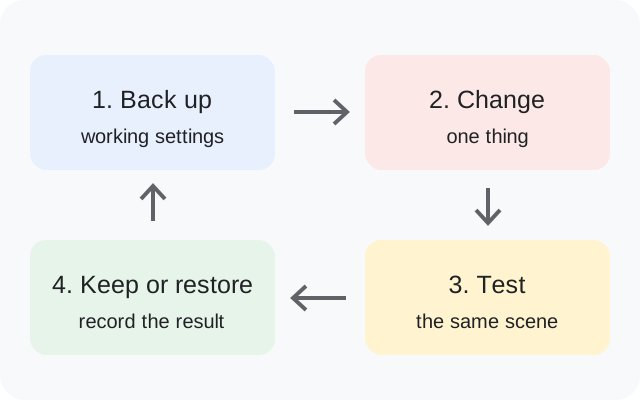
Back up, change one thing, test the same scene, then keep or restore the setup
Original backup and testing diagram.

R8 questions answered

Is Lite another package name for full R8?

The source lists separate Lite filenames. It does not provide a complete feature comparison.

What does the System page contain?

The changelog groups camera-operation parameters there.

Does its video fix guarantee Vivo compatibility?

No. The developer says some devices, and does not name every supported model.

Release facts: developer notes ↗. See the APK testing disclosure.

Sources & editorial responsibility

Release and setup references are listed below. Read the testing and evidence policy for the scope of Muzamil Ahad’s reported APK testing.

Founder & APK reviewer: Muzamil Ahad. How the guide was researched · Report a correction.