
R18 focuses on camera controls. Compare its practical changes with the R17 setup you already use.
The short answer
LMC 8.4 R18 adds interface and control changes; the developer does not present it as an image-quality upgrade over R17. Keep R17 if it works well for your phone. Try R18F1 when its controls or camera-access defaults address a specific need, with your current APK and XML saved.
What changed between the two releases?
R17 introduces processing controls, including additions to the test patcher and gain settings, plus a Samsung metering option. R18 changes how controls are reached and displayed, adds model-loading options and revises default auxiliary-camera IDs for many devices.
Those are different reasons to choose a build. Someone adjusting processing may care about R17's controls; someone who struggles with the interface may prefer R18's layout. The developer's R18 notes do not claim a general improvement in photographic quality. A release number alone cannot tell you which saved photo you will prefer.
Read the full APK filename
The R18 source currently lists files named R18F1, while its release heading says R18. R17 has its own APK set. Use the complete filename and package, particularly when keeping two camera installations or following a contributor's instructions.
| Choice | R17 | R18 source listing |
|---|---|---|
| Standard filename | LMC8.4_R17.apk | LMC8.4_R18F1.apk |
| Source-listed variants | Standard, Snapcam, Aweme, Scan3D, Google Lens | Those variants plus Iris |
| Main reason to compare | Existing processing and working profiles | Interface and control changes |
The package guide explains why a Samsung or OnePlus recommendation must stay tied to its model and firmware.
Will an R17 XML load on R18?
R18's release notes allow previous configurations. That is a useful starting point, but the loaded profile still needs to match the phone, camera IDs and any required library. Check main, selfie and auxiliary lenses after importing. A profile that opens without an error can still leave one camera unusable.
The explicit R18 references can narrow the choice. The wider R16+ category also contains files without a confirmed individual release assignment. Keep those categories distinct when deciding which file to try.
Make the switch reversible
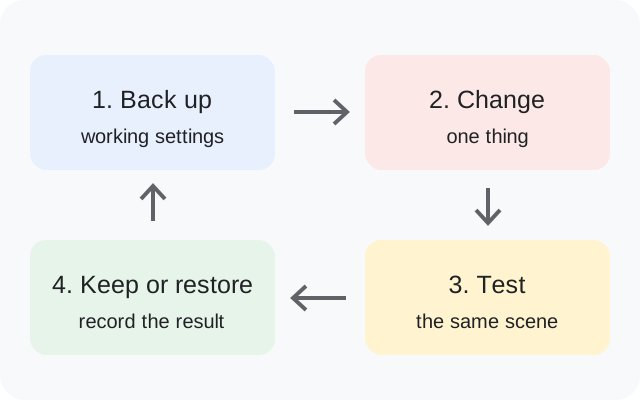
- Export the working R17 settings and copy the XML outside the app's private data.
- Record the APK filename and package ID, plus the phone's firmware and Android version.
- Check whether the new package will update the existing app, conflict with its signature or install separately.
- Open R18 with defaults and save a main-camera photo before importing your backup.
- Try the same scene and lens in both setups, then test the functions you use most.
If Android requires removal of the old installation, make the backup before uninstalling. Follow the installation guide for source permissions and conflict checks.
When keeping R17 is reasonable
Keep a reliable R17 setup when it already gives you the lenses, capture behavior and output you need. A working configuration has value, especially before a trip or event when there is little time to troubleshoot.
Try R18 when you can point to a release change you need and have time to test it. If results differ, record the XML, lens and setting responsible instead of assuming the new release caused every change. For other builds, use the complete release history. This comparison is based on developer notes and a migration method, not a controlled camera benchmark.