
Create LMC8.4 directly in shared internal storage, beside DCIM and Download. The LMC 8.4 R15 and R16+ config indexes specify /LMC8.4/. Put the extracted XML inside that folder.
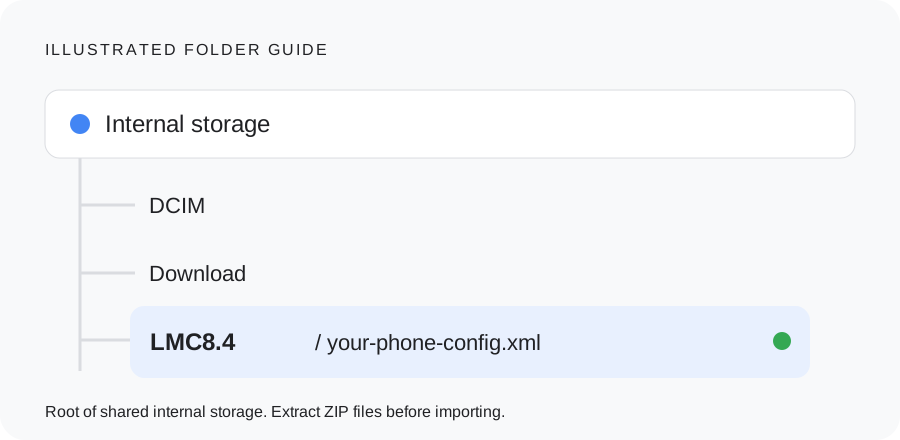
Use the LMC path for these indexed releases
For the primary Android user, a file manager may show the path as /storage/emulated/0/LMC8.4/. Start from its Internal storage view. The leading slash in the config instructions refers to the shared-storage root, not the Android system filesystem.
Create one folder named LMC8.4. Opening it should show the XML file itself. If you see another folder with the same name, move the XML up one level.
Why a generic GCam folder can be wrong
| Build family | Documented directory |
|---|---|
| LMC 8.4 R15 / R16+ indexes | /LMC8.4/ |
| Generic GCam 8.x examples | /GCam/Configs 8/ |
| Generic GCam 7.x examples | /GCam/Configs 7/ |
| Generic GCam 6.x examples | /GCam/Configs/ |
Use the directory documented for your camera port. A generic GCam tutorial may show a different folder even when both apps use a Google Camera 8.x base. Creating every folder in this table is unnecessary.
Older LMC releases, 8.8 and 9.6 need their own instructions. You can also find the directory used by an installed build by saving a temporary config from its settings and locating that file.
A quick folder check
- Open shared internal storage. Check that LMC8.4 is beside DCIM and Download, rather than inside Download or Android/data.
- Open LMC8.4 and confirm it contains the actual XML. Extract archives and remove an accidental extra extension such as .xml.txt.
- Save a temporary config in LMC and find the new file. Its location shows where that installed build writes configs.
- If the XML exists but the chooser is empty, review file access for LMC. Android version, app target and firmware can change which storage options appear.
Next step
Follow the XML import guide to back up your current settings, restore the file and check each camera. A visible filename confirms that the chooser found the file; check the saved output after importing it.
Check the result before continuing
Check these three look-alike paths
Internal storage / LMC8.4 / preset.xmlThe XML sits directly inside the folder.
Download / LMC8.4 / preset.xmlThis folder is still inside Download, not at the storage root specified by the indexes.
LMC8.4 / preset.zipExtract the archive and move its actual XML. Changing an extension does not convert a ZIP.
An app export is the practical tie-breaker when an older or different branch uses another path. Use a file manager to locate the saved file; do not place configs in Android’s system root or assume an Android/data directory belongs to the current app.
Keep your working setup recorded
Save these details with your backup so you can restore the setup or report a failure.
________________________
________________________
________________________
________________________
________________________
________________________
Copy these fields into your notes or download the blank device-test worksheet. Nothing in this checklist is submitted to the site.