
For G82, choose Kefir with its documented R16 scope if you want a profile with a clear button legend; the current model-named alternative has less explanatory text.
LMC 8.4 for Motorola: Device Evidence & XML Configs
LMC 8.4 for Motorola: use the model-specific read-me when available
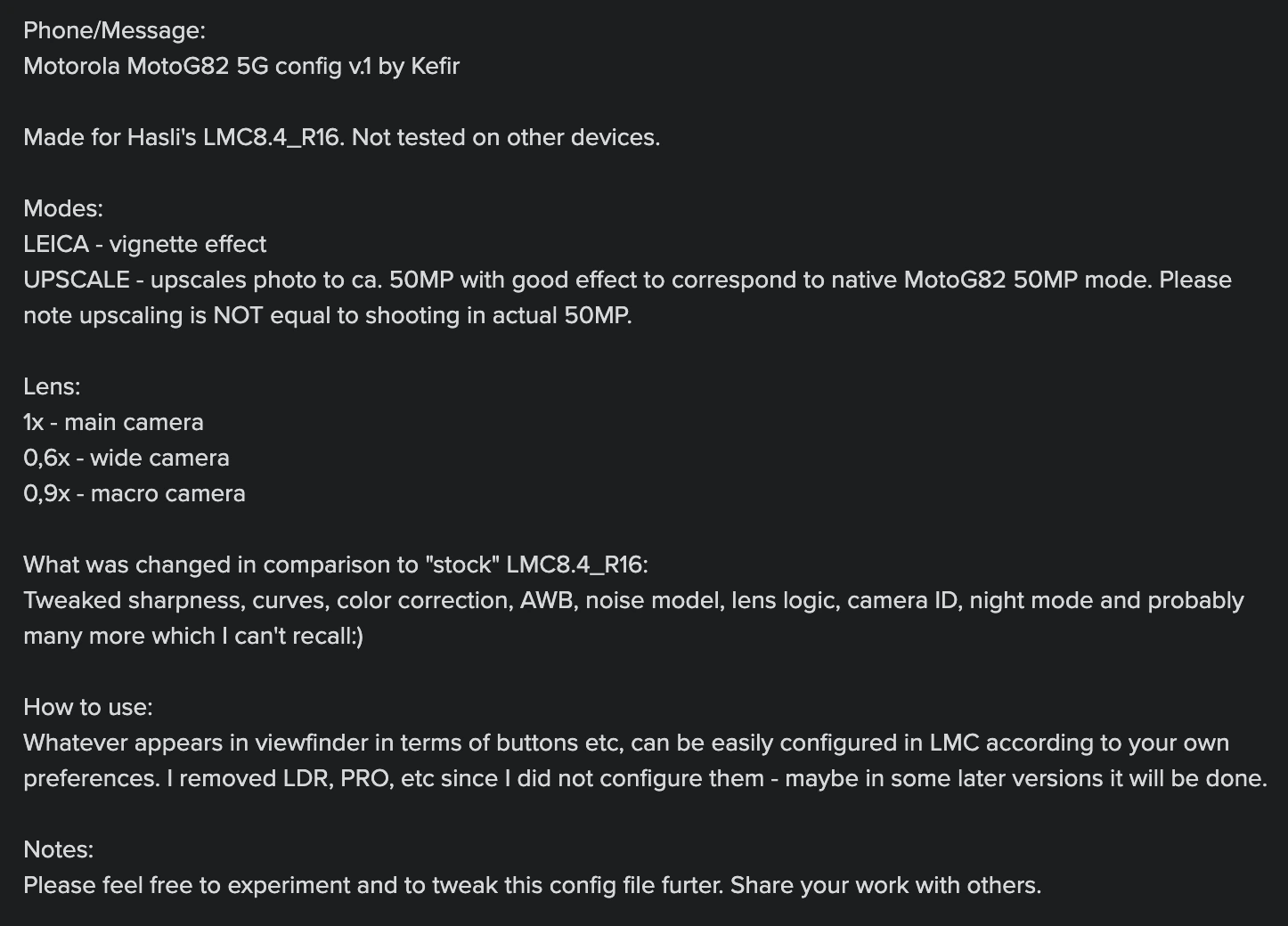
Use the exact Motorola model heading. Edge 20 has files in both current and older indexes; Edge 50 Pro has a beta-labelled file; G52 has one sparsely documented entry. For G82, Kefir explains the R16 setup, 1x/0.6x/0.9x controls and the difference between upscaled output and native-resolution capture.
For Edge 50 Pro, treat the R18 beta filename as a contributor label and verify everyday photo behavior before testing optional features.
For Edge 20 and G52, use their exact model headings; nearby Pro, Lite, Neo or other G-series entries do not substitute for them.
Package and firmware guidance
The selected Motorola records do not name a package for every phone. Follow a package recommendation only where the release or exact model instructions give one.
G82 Kefir UPSCALE interpolates an image to around 50 MP according to the contributor. Start with upscaling off, then compare saved detail and file size at the same viewing size.
Read the instructions for this specific profile
Does the G82 UPSCALE button capture true 50 MP detail?
The contributor explicitly distinguishes upscaling from actual 50 MP shooting. Compare fine detail at the same viewing size instead of judging by pixel dimensions alone.
Is an Edge 50 Pro XML suitable for Edge 50 Neo or Fusion?
Those are separate targets. The current Pro listing does not establish their compatibility.
Source notes: Hasli LMC8.4 R16+ community config index ↗ Hasli LMC8.4 R15 community config index ↗ Kefir Moto G82 R16 profile instructions ↗
Read the model-specific community evidence for Motorola. A successful setup on another regional variant, ROM or Android version may not transfer to your phone.
Choose an exact match
Use your device’s model code and chipset where the source distinguishes variants. The entries below retain release assignments, package recommendations and unresolved details. Muzamil reports APK testing across the listed models; individual firmware and mode results are explained in the testing policy.
Try defaults first, export working settings, then import a sourced XML. Follow the installation guide and XML setup. Select the documented package rather than guessing from the phone brand.
4 matching devices. Community evidence; check the variant details.
Community XML referenceFounder-reported APK testing
Motorola Edge 20
Start here
Confirm plain Edge 20. Use davlock.xml as the current community trial, saving a default-camera reference before comparing Edge20.1.xml.
Choosing the configKeep davlock.xml and the older Edge20.1.xml as separate candidates. Record the APK and package before comparing them because the source does not supply a complete setup.
Model-specific setup checks
Separate Edge 20 from Pro and Lite
Keep the full Settings model name with the imported file. A nearby Edge 20 Pro profile or another Edge-series instruction is a different target.
Compare current and older files with the same framing
Use a stationary distant subject and a nearby textured object. Check focus and saved detail before switching to a different XML on the basis of its age.
Record the working package yourself
The selected Edge 20 entries do not supply a package rule. Keep the installed APK/package with any successful lens test so that the next import preserves a reproducible setup.
Test in this order
- Save a default main-camera reference on exact Edge 20.
- Import davlock and check front/exposed auxiliary photos.
- Compare Edge20.1 on the same scene only if the current result does not meet the need.
Keep separate: Motorola Edge 20 Pro; Motorola Edge 20 Lite
Profile source / instructions ↗ Profile source / instructions ↗
Variant limits and source evidence (2)
The indexes provide separate current and R15 references. Do not confuse Edge 20 with Edge 20 Pro or Lite. No exact tested release, package or firmware recommendation is documented.
davlock.xml
Release: R16+ index; exact release unconfirmed
Package: No verified package recommendation
Author: Not attributed in index
Edge20.1.xml
Release: R15 index; exact release unconfirmed
Package: No verified package recommendation
Author: Not attributed in index
Community XML referenceFounder-reported APK testing
Motorola Edge 50 Pro
Start here
Confirm Edge 50 Pro, save the current settings and start with one ordinary daylight photo. Keep the filename's beta label visible in your setup notes.
Choosing the configUse the exact Edge 50 Pro entry. Check the APK and saved camera output; the beta/R18 filename alone is not a published release-test record.
Model-specific setup checks
Check everyday capture before optional effects
Save main and front samples after import, then try any exposed auxiliary controls. Keep a known working setup available while assessing the beta-labelled file.
Inspect focus and processed detail
Use small lettering and a textured subject, then view the saved image at equal size beside the reference. This reveals missed focus or heavy processing more clearly than a colorful preview.
Keep other Edge 50 models out of the match
Neo, Fusion and Ultra need their own evidence. Select the full Pro model rather than treating Edge 50 as one shared camera target.
Test in this order
- Confirm Pro, back up settings and record the APK/package.
- Import the beta-labelled file and save main/front samples.
- Test auxiliary and low-light capture separately, keeping exact failure notes.
Keep separate: Motorola Edge 50 Neo; Motorola Edge 50 Fusion; Motorola Edge 50 Ultra
Is Edge50ProLMC8.4R18beta.xml a verified R18 setup?
R18beta appears in the filename. The inspected index does not independently state a tested-release result, so the catalogue preserves that distinction.
Variant limits and source evidence (1)
The filename labels the file R18 beta; the index itself supplies no tested-release confirmation. Keep Edge 50 Pro separate from Neo/Fusion/Ultra. This is a community profile with unverified camera/firmware coverage.
Edge50ProLMC8.4R18beta.xml
Release: R16+ index; exact release unconfirmed
Package: No verified package recommendation
Author: Not attributed in index
Community XML referenceFounder-reported APK testing
Motorola Moto G52
Start here
Confirm Moto G52 and save a stock/default-LMC reference with a face, neutral object and fine texture before importing sahabulfinal.xml.
Choosing the configTry sahabulfinal.xml for G52 and check a default photo before other modes. The source supplies no exact release, package or intended color description.
Model-specific setup checks
Use an ordinary mixed reference scene
A face, white object and fine lettering in the same frame make color and texture differences visible without assuming an undocumented intended look.
Check the front camera before extra modes
The G52 source lacks a front-camera report. Save a selfie as part of the first check so the result matches the way you use the phone.
Do not borrow the G82 button legend
The G82 Kefir instructions explain different source files. Learn the actual G52 controls from saved output rather than transferring nearby G-series labels.
Test in this order
- Save the mixed reference scene before import.
- Load sahabulfinal and repeat main/front samples.
- Check any exposed auxiliary mode and record the working APK/firmware combination.
Keep separate: Motorola Moto G51; Motorola Moto G53; Motorola Moto G82
Variant limits and source evidence (1)
Community config exists but the index does not specify exact release, package, author, intended look or camera/firmware coverage.
sahabulfinal.xml
Release: R16+ index; exact release unconfirmed
Package: No verified package recommendation
Author: Not attributed in index
Community XML referenceFounder-reported APK testing
Motorola Moto G82
Start here
For an explained baseline, use the Kefir profile with R16 and leave UPSCALE off initially. Test the documented 1x, 0.6x and 0.9x controls separately.
Choosing the configFollow the Kefir R16 instructions when choosing that profile. Motog82Lmc8.4V1.0.xml is a separate current option; check the older ORG-Stable file on your firmware instead of relying on its name.
Model-specific setup checks
Read the nonstandard macro label
Kefir's 0.9x button is described as macro, while 0.6x is wide and 1x main. Use a close detailed subject for macro and inspect the saved focus rather than assuming 0.9x is only digital zoom.
Compare UPSCALE at equal viewing size
The contributor says the roughly 50 MP upscaled output is not actual 50 MP shooting. Compare fine detail and file size with the option off before deciding it helps.
Do not enable unconfigured processing blindly
Kefir notes that LDR and PRO were removed because they were not configured in this version. Keep the supplied baseline before adding viewfinder controls from another profile.
Test in this order
- Confirm R16 and load Kefir with UPSCALE off.
- Save main, wide, macro and front samples.
- Compare UPSCALE on/off at equal size, then try another G82 file only if needed.
Keep separate: Other Moto G models without their own entry
Why does Moto G82 Kefir show 0.9x as macro?
That is the contributor's documented control label for this XML. Save a close-detail sample to verify its behavior on the phone.
Does UPSCALE add real 50 MP capture?
Kefir explicitly says the upscaled output is different from actual 50 MP shooting. Judge useful saved detail rather than the larger pixel count alone.
Profile source / instructions ↗ Profile source / instructions ↗ Profile source / instructions ↗
Variant limits and source evidence (3)
Both current and R15 references exist. Stable in an old filename is a contributor label, not a stability test by this site. Extra Kefir description is linked as an image and has not been transcribed here.
Motog82Lmc8.4V1.0.xml
Release: R16+ index; exact release unconfirmed
Package: No verified package recommendation
Author: Not attributed in index
Kefir-V1-LMC-MotoG82.xml
Release: R16
Package: No verified package recommendation
Author: Kefir (attributed in contributor instructions)
Motorola-G82-ORG-Stable.xml
Release: R15 index; exact release unconfirmed
Package: No verified package recommendation
Author: Not attributed in index
No verified recommendation in our catalog. Check your exact variant and source notes; a similar model is not enough.
Keep your working setup recorded
Save these details with your backup so you can restore the setup or report a failure.
Phone model / region
________________________
ROM and Android version
________________________
Full APK filename
________________________
Android package ID
________________________
XML filename / library
________________________
Lens and mode that you tested
________________________
Copy these fields into your notes or download the blank device-test worksheet. Nothing in this checklist is submitted to the site.
Sources & editorial responsibility
Release and setup references are listed below. Read the testing and evidence policy for the scope of Muzamil Ahad’s reported APK testing.
Founder & APK reviewer: Muzamil Ahad. How the guide was researched · Report a correction.