LMC / INDEPENDENT GUIDE

LMC 8.4 R14 APK Download: Files & Release Notes

R14 changes interface styling, reduces animation use and adds system noise-model options. Default tone and gamma behavior also change, so compare a photo with defaults before importing an older XML.

Hub listing date2022-10-11
Separate fix dateNot confirmed
Minimum AndroidNot stated in source

Documented changes

  • Material You styling, system noise models, and noise-model tuning were introduced.
  • The update reduces animation use, expands noise-fix values, changes defaults, and uses smoother tone/gamma curves.

Configuration and known limits

  • The author recommends a clean installation and supports earlier configs.
  • The release documents limitations in system noise-model tuning and dynamic ISO selection.

The main catalog separates the R15 and R16+ config indexes. For this historical build, follow the exact release source and its notes; a modern XML listing is not proof it works on this release.

Configuration reference ↗

Install and test this build

Export existing settings before replacing an app with the same package ID. Install one variant, confirm default camera operation, then load a matched XML and test each lens separately. See APK installation, XML import, and crash diagnosis.

Unverified metadata

  • Minimum Android version, file size, cryptographic hash, and exact upstream patch number were not confirmed by this release page.
Exact files and package choices

Variant / exact filenameAndroid package IDAvailability
DefaultLMC8.4_R14.apkcom.google.android.GoogleCameraEngR14Find this APK in the original archive ↗
SnapcamLMC8.4_R14_Snapcam.apkorg.codeaurora.snapcamFind this APK in the original archive ↗
SamsungLMC8.4_R14_Samsung.apkcom.samsung.android.rulerFind this APK in the original archive ↗
Google LensLMC8.4_R14_GLens.apkcom.google.android.GoogleCameraEngFind this APK in the original archive ↗

Compare package IDs · Browse XML evidence · All researched releases

When does R14 make sense?

A reason to try it

Relevant changes

You specifically need its interface or noise-model options and accept its documented limitations.

A reason to keep your current setup

Your current setup

You depend on Dynamic ISO noise-model selection or already have a dependable later build.

What to check when you switch

  1. Export settings before the recommended clean installation.
  2. Test default output before importing older XML.
  3. Compare moving subjects when increasing Lut Noise Fix.
Before importing your XML

This release documents nonworking system-model tuning and Dynamic ISO selection.

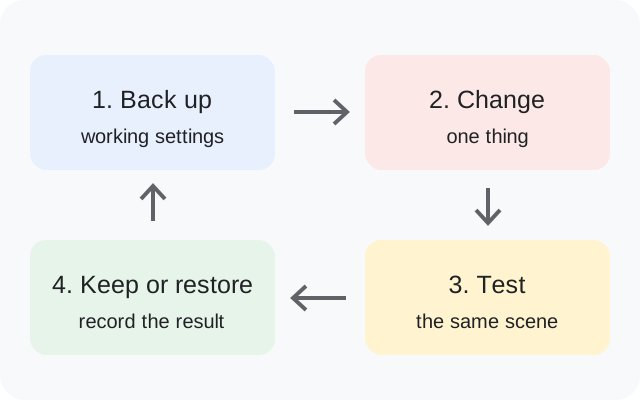
Back up, change one thing, test the same scene, then keep or restore the setup
Original backup and testing diagram.

R14 questions answered

Should R14 be installed cleanly?

The developer recommends a clean installation and says earlier configs are supported.

Why does Dynamic ISO not work?

Dynamic ISO selection is a documented R14 limitation. Check it before investigating a hardware fault.

Is a higher Lut Noise Fix always better?

The notes describe a tradeoff: stronger noise reduction can bring more motion artifacts.

Release facts: developer notes ↗. See the APK testing disclosure.

Sources & editorial responsibility

Release and setup references are listed below. Read the testing and evidence policy for the scope of Muzamil Ahad’s reported APK testing.

Founder & APK reviewer: Muzamil Ahad. How the guide was researched · Report a correction.